
Browsilla vs Pullsy
Side-by-side comparison to help you choose the right product.

Browsilla
Browsilla transforms your Chrome new tab into a focused workspace with tasks, bookmarks, weather, and inspiration.
Last updated: February 25, 2026

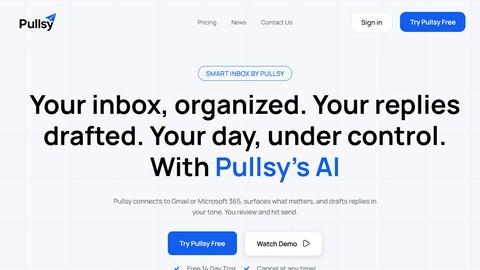
Pullsy organizes your inbox, drafts tailored replies, and prioritizes important messages to streamline your day.
Last updated: February 25, 2026
Visual Comparison
Browsilla

Pullsy
Feature Comparison
Browsilla
Task Manager Built-In
Browsilla incorporates a robust task management system directly within the new tab interface. Users can create and organize tasks into folders, allowing for seamless tracking of to-do items. This feature eliminates the need to switch between applications, as your tasks are always visible, ensuring nothing slips through the cracks.
Quick Bookmarks
This feature allows users to pin their most frequently accessed websites directly on the new tab. No more wasting time digging through bookmark folders; with Browsilla, you can quickly add, organize, and access your bookmarks right from the dashboard. This instant access enhances efficiency and saves time during your browsing sessions.
Local Weather
Stay informed about the weather conditions in your area without needing to open an additional tab. Browsilla displays the current weather and temperature automatically, helping you plan your day more effectively. This integration ensures that you are always prepared for the elements before diving into your online tasks.
Daily Inspiration
To kick off each browsing session positively, Browsilla provides users with a motivational quote. This small yet impactful feature aims to inspire productivity and set an encouraging tone for the day ahead, helping to cultivate a focused and optimistic mindset as you work.
Pullsy
AI Drafting in Your Tone
Pullsy's AI drafting feature creates context-aware responses that match your voice and tone. By selecting from options like Professional, Friendly, or Quick, users can ensure their replies resonate with the intended audience while saving time.
Intelligent Email Organization
The platform automatically identifies and highlights important messages, allowing users to focus on what truly matters. By filtering out less significant emails, Pullsy enables a stress-free inbox experience where critical tasks take precedence.
Personalized Daily Summaries
Start each day with a tailored overview of what requires your attention. Pullsy provides a personalized summary that highlights new messages, upcoming meetings, and top priority tasks, ensuring users remain organized and prepared.
Enhanced Search and Filtering
Pullsy offers a smarter way to search, filter, and comprehend emails, enabling users to locate essential information swiftly. With intelligent insights, managing communications becomes effortless, and staying organized is no longer a chore.
Use Cases
Browsilla
Enhancing Productivity for Professionals
For busy professionals juggling multiple tasks, Browsilla serves as a centralized hub for managing daily responsibilities. By having a dedicated space for tasks, bookmarks, and weather updates, users can streamline their workflow and minimize distractions, ultimately enhancing productivity.
Supporting Creative Projects
Creators and artists can benefit from Browsilla by keeping their essential resources, such as design tools and inspiration links, readily accessible. The quick bookmarks feature allows for efficient navigation to frequently used sites, enabling a smoother creative process.
Simplifying Task Management
Individuals who struggle with task organization can leverage Browsilla's built-in task manager to keep track of their daily to-do lists. By checking off completed tasks directly within the new tab, users can maintain focus and motivation throughout their work sessions.
Streamlining Research Activities
Researchers and students can utilize Browsilla to manage their online resources effectively. With quick access to relevant bookmarks and the integrated search bar, users can conduct research more efficiently, reducing the time spent switching between tabs and applications.
Pullsy
Efficient Email Management for Entrepreneurs
Entrepreneurs often juggle multiple responsibilities, making email management a challenge. Pullsy helps them streamline their inbox, allowing for quick replies and organized communication, freeing up time for strategic decision-making.
Team Collaboration and Communication
Small teams can leverage Pullsy to maintain clarity and collaboration. The AI assistant organizes team emails, drafts responses, and ensures everyone is on the same page, enhancing overall productivity and reducing miscommunication.
Time-Saving for Busy Professionals
Professionals inundated with emails can utilize Pullsy to manage their inbox more efficiently. By automating replies and highlighting important messages, users can focus on their core tasks rather than getting bogged down by email overload.
Simplified Document Management
Pullsy is an excellent tool for individuals handling numerous documents and attachments. The ability to summarize emails and review PDFs quickly allows users to extract essential information without wasting precious time.
Overview
About Browsilla
Browsilla is an innovative Chrome extension designed to transform your browsing experience by redefining the functionality of a new tab. It serves as a serene, efficient hub that consolidates essential tools and information, eliminating the chaos often associated with traditional new tab pages filled with ads and distractions. Browsilla targets creators, entrepreneurs, and professionals who value productivity and focus. By showcasing a minimalistic dashboard that features your to-do list, frequently used links, saved bookmarks, and current weather, it ensures that you only see what truly matters. This extension emphasizes a privacy-first approach, requiring no account creation or data tracking, allowing users to navigate their tasks without the burden of unnecessary complications. With Browsilla, every new tab becomes an opportunity to engage in productive work, helping you stay organized and motivated throughout your day.
About Pullsy
Pullsy is an innovative AI-powered inbox assistant designed for busy professionals, entrepreneurs, and small teams seeking to regain control over their email communications. By seamlessly integrating with popular email platforms like Gmail and Outlook, Pullsy revolutionizes the way users interact with their inbox. It employs advanced AI algorithms to intelligently label incoming emails, prioritize important messages, and draft context-aware replies in a tone that reflects the user's unique style. With features such as the “Ask Pullsy” functionality, users can quickly summarize lengthy email threads, review PDF documents, and extract key insights without the usual time-consuming search. Pullsy not only enhances productivity by allowing users to navigate their inbox up to three times faster but also transforms email management from a tedious chore into a streamlined, efficient workflow. The straightforward setup, clean user interface, and a free 14-day trial make Pullsy an essential tool for anyone looking to optimize their email experience.
Frequently Asked Questions
Browsilla FAQ
Is Browsilla really free?
Yes, Browsilla is completely free to use. There are no hidden fees or premium features that require payment, making it accessible to everyone.
Do I need to create an account?
No account creation is necessary to use Browsilla. You can install the extension and start using it immediately without providing any personal information.
Does Browsilla work offline?
Browsilla requires an internet connection to function since it pulls data for weather updates and online bookmarks. However, once loaded, you can view your task list and previous bookmarks without an active connection.
Is my data private and secure?
Browsilla prioritizes user privacy by not tracking personal data or requiring accounts. Your information remains anonymous, and self-hosted analytics are used to improve the extension without compromising your security.
Pullsy FAQ
What is Pullsy and how does it work?
Pullsy is an AI-powered inbox management tool that connects to Gmail and Outlook. It automatically organizes messages, highlights important content, and suggests replies, allowing users to clear their inbox faster and with less mental load.
Is Pullsy safe to use?
Yes, Pullsy prioritizes data security and is Google OAuth Verified, CASA completed, and SOC Type 2 in process. It is also GDPR compliant, ensuring that user information remains protected at all times.
Do I need a credit card to start the free trial?
No, users can begin their 14-day free trial without providing any credit card information. This allows potential customers to explore Pullsy's features risk-free.
Can Pullsy help with meeting reminders?
Absolutely! Pullsy integrates with calendar functionalities to help users keep track of their meetings and important calls, ensuring they remain organized and prepared throughout the day.
Alternatives
Browsilla Alternatives
Browsilla is a transformative Chrome extension that redefines the new tab experience, placing an emphasis on productivity and organization. It falls under the category of productivity and management tools, specifically designed to cater to creators, entrepreneurs, and professionals who strive for focus in their daily tasks. Users often seek alternatives to Browsilla for various reasons, including pricing, specific feature sets, compatibility with other platforms, or personal preferences for user interface design. When searching for an alternative, it's important to consider what features are essential for your workflow, such as task management capabilities, bookmark organization, and additional integrations that may enhance your productivity. Additionally, evaluate the ease of use, privacy policies, and any associated costs to ensure the chosen tool aligns with your needs and expectations.
Pullsy Alternatives
Pullsy is an AI-powered inbox assistant that falls under the productivity and management category, designed to help busy professionals, entrepreneurs, and small teams streamline their email communications. Users often seek alternatives due to a variety of reasons, including pricing structures, the need for specific features, or compatibility with different email platforms. It is essential to consider factors such as user interface, integration capabilities, and the ability to customize features when choosing an alternative, as these elements can significantly impact the overall email management experience.