
Blur Image Online vs MyImageUpscaler
Side-by-side comparison to help you choose the right product.

Blur Image Online
Blur Image Online offers fast, browser-based tools to expertly blur faces, text, and sensitive areas with complete co...
Last updated: February 26, 2026

MyImageUpscaler
MyImageUpscaler uses AI to enhance images to 4K quality in seconds while preserving sharp text and real details.
Last updated: February 25, 2026
Visual Comparison
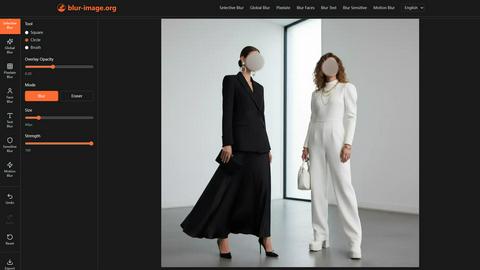
Blur Image Online
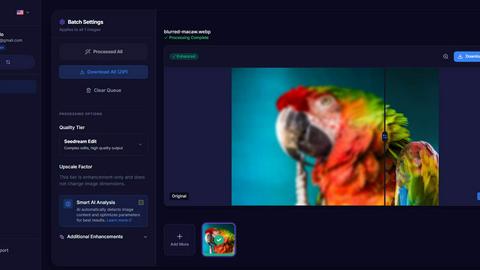
MyImageUpscaler
Feature Comparison
Blur Image Online
Selective Blur
The Selective Blur feature provides users with unparalleled control over their images. You can precisely choose which parts remain sharp and which areas should be blurred, allowing for creative effects or privacy protection. This tool is ideal for emphasizing a subject or hiding sensitive details with professional precision.
Global Blur
With the Global Blur feature, users can apply a uniform blur effect across an entire image with a single click. Afterward, you can utilize the Eraser and Blur modes to selectively restore clarity in specific areas. Adjustable parameters such as strength, hardness, and global intensity allow for fine-tuning to achieve desired depth-of-field effects.
Pixelate Blur
The Pixelate Blur feature enables users to obscure sensitive areas by converting them into uniform blocks. Whether you wish to pixelate the entire image or specific regions, this tool offers various selection methods, including painting and shape-based selections, ensuring meticulous control over the pixelation process.
AI Detection for Faces and Text
The AI-powered Blur Faces and Blur Text features automatically detect and blur faces and text within your images. This advanced functionality allows you to maintain privacy effortlessly by simply clicking a button, while also offering manual tools for further refinement if needed.
MyImageUpscaler
Advanced Detail Preservation
MyImageUpscaler employs sophisticated algorithms that effectively preserve fine details in images during the upscaling process. This results in crisp, clear images without the typical blur or artifacts that can occur with standard upscaling techniques.
Fast Processing Times
Users can process images in under 10 seconds, making MyImageUpscaler an incredibly efficient tool for those needing to enhance large volumes of images quickly. This speed is particularly advantageous for businesses that require rapid turnaround times for their visual content.
Batch Processing Capability
The platform supports batch processing, allowing users to upscale up to 500 images at once. This feature is invaluable for photographers or businesses that need to process large quantities of images simultaneously, saving time and effort.
Platform-Ready Presets
MyImageUpscaler includes presets tailored for various platforms such as Amazon, Instagram, YouTube, and TikTok. These presets ensure that images are optimized for specific requirements, helping users maintain visual consistency across different channels.
Use Cases
Blur Image Online
Protecting Personal Information
Individuals can use Blur Image Online to protect sensitive information in photographs, such as credit card numbers or personal identifiers. By applying the Blur Sensitive Info feature, users can ensure their private data is obscured before sharing images online.
Enhancing Artistic Photography
Photographers can leverage the Selective Blur and Global Blur features to create artistic effects in their images. By manipulating focus and blur, they can guide the viewer's eye to specific subjects or create a more immersive experience through depth-of-field techniques.
Social Media Sharing
Before posting images on social media, users can quickly blur out any unwanted details that may compromise their privacy. The AI detection tools for faces and text make it easy to prepare images for public viewing without worrying about revealing sensitive information.
Creating Marketing Materials
Marketers can utilize the various blur tools to create compelling visuals for ads or brochures. By selectively blurring backgrounds or sensitive information, they can highlight key messages while maintaining a professional appearance in their materials.
MyImageUpscaler
E-commerce Sellers
E-commerce sellers can utilize MyImageUpscaler to enhance product images for their online stores. By improving image quality, they can attract more customers and increase conversion rates, making their products stand out in a competitive market.
Content Creators for Social Media
Content creators can benefit from the platform by resizing images for social media posts. With the ability to enhance quality while maintaining sharpness, creators can ensure their visuals are eye-catching and engaging for their followers.
Real Estate Agents
Real estate agents can use MyImageUpscaler to prepare high-quality images for MLS listings. By enhancing property photographs, agents can present homes in their best light, ultimately driving more interest and potential buyers.
Photographers Processing Large Batches
Professional photographers can expedite their workflow by using MyImageUpscaler for batch processing. Whether for client work or personal projects, the ability to upscale and enhance multiple images at once helps photographers save time and focus on their creative vision.
Overview
About Blur Image Online
Blur Image Online is a sophisticated, browser-based tool designed for users who need precise control over image blurring for privacy and aesthetic purposes. This platform offers a suite of features that allow individuals to selectively blur specific areas of an image while keeping other parts sharp and clear. Whether you are a photographer looking to create depth-of-field effects or an everyday user seeking to obscure personal information, this tool serves a diverse audience. Its main value proposition lies in its commitment to privacy; unlike traditional online editors that might store your images on their servers, Blur Image Online ensures that your images remain secure and are not retrievable after processing. With advanced AI capabilities and a user-friendly interface, anyone can achieve professional-grade results in mere moments.
About MyImageUpscaler
MyImageUpscaler is a cutting-edge AI-powered platform designed to enhance and upscale images for businesses and content creators. By leveraging advanced machine learning algorithms, MyImageUpscaler can increase the resolution of images by 2x to 4x without compromising on quality. The platform is particularly beneficial for e-commerce sellers, real estate agents, photographers, and social media content creators who require high-quality visuals for marketing and promotional purposes. With a focus on maintaining sharpness and enhancing fine details, MyImageUpscaler ensures that every image looks professional and polished. It offers a free tier with 10 credits, allowing users to experience its capabilities without the need for a credit card. As a result, MyImageUpscaler stands out as a reliable solution for anyone looking to improve their image quality efficiently and effectively.
Frequently Asked Questions
Blur Image Online FAQ
Is Blur Image Online free to use?
Yes, Blur Image Online is completely free to use. It offers powerful image editing capabilities without any hidden costs or subscriptions.
How does the AI detection for faces and text work?
The AI detection technology automatically identifies faces and text within your images, applying blur effects instantly. This allows for quick privacy protection without manual adjustments, although users can refine the results if needed.
Can I use Blur Image Online on my mobile device?
Yes, Blur Image Online is designed to be browser-based and works seamlessly on any modern device, including desktops, tablets, and smartphones, making it highly accessible.
Are my images safe when using this tool?
Absolutely. Blur Image Online does not store your images on remote servers, ensuring that your content remains private and is not retrievable after processing. Your privacy is a top priority.
MyImageUpscaler FAQ
What image formats does MyImageUpscaler support?
MyImageUpscaler supports a variety of image formats including JPEG, PNG, and AVIF, ensuring versatility for users with different types of images.
How does the free tier work?
The free tier provides users with 10 credits to use on image enhancements without requiring a credit card. Unused credits can accumulate, allowing users to try the platform without any financial commitment.
Can I upscale images for print?
Yes, MyImageUpscaler is designed to maintain high quality even at larger resolutions, making it suitable for preparing images for print while ensuring clarity and detail.
Is there a limit on how long enhanced images are stored?
Enhanced images are automatically deleted after 7 to 30 days, depending on the specific plan chosen. This helps maintain user privacy and manage storage efficiently.
Alternatives
Blur Image Online Alternatives
Blur Image Online is an advanced, browser-based tool that allows users to blur specific areas of images while keeping other parts clear. It falls into the category of design tools, specifically within the realm of image and photo editing. Users commonly seek alternatives for various reasons, including pricing considerations, the need for specific features, or compatibility with different platforms or devices. When selecting an alternative, users should prioritize ease of use, the level of control over blurring options, privacy policies regarding image handling, and the range of additional features that may enhance their editing experience. A good alternative should also provide a secure environment for image processing, ensuring that user data remains confidential.
MyImageUpscaler Alternatives
MyImageUpscaler is a state-of-the-art AI-powered platform that specializes in enhancing and upscaling images to stunning 4K quality. This tool falls under the category of productivity and management, catering to businesses and content creators who require high-resolution visuals for their marketing efforts. Users often seek alternatives to MyImageUpscaler for various reasons, including pricing structures, specific feature sets, and varying platform needs that align better with their individual workflows or project requirements. When searching for an alternative, it is essential to consider factors such as processing speed, quality of image enhancement, batch processing capabilities, and compatibility with various platforms. Additionally, evaluating user experience, customer support, and pricing can help users find a solution that best meets their needs while ensuring that the final output maintains the level of professionalism they require.