
BlitzCut vs Seedance 2
Side-by-side comparison to help you choose the right product.

BlitzCut
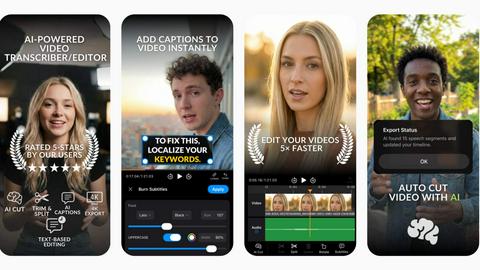
BlitzCut is an AI video editor that swiftly removes silence and adds captions, turning raw clips into shareable content.
Last updated: February 25, 2026

Seedance 2
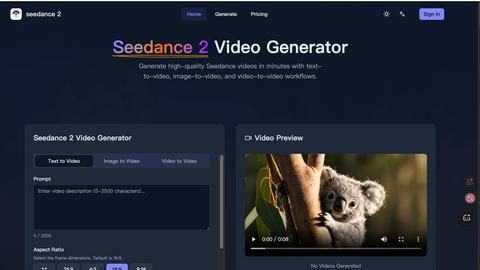
Seedance 2 generates cinematic videos from text, images, and clips with easy control and high-quality results.
Last updated: February 25, 2026
Visual Comparison
BlitzCut
Seedance 2
Feature Comparison
BlitzCut
Automatic Silence Removal
BlitzCut's automatic silence removal feature leverages advanced AI technology to detect and eliminate pauses in videos. This process occurs in real time, allowing creators to save significant amounts of time while editing. Instead of manually cutting out silence, users can focus on crafting their narrative, enhancing the overall efficiency of their editing workflow.
AI Captions
With over 95 percent accuracy, BlitzCut's AI captions feature generates styled captions that are perfectly aligned with trending aesthetics. This functionality not only saves time but also enhances viewer engagement by ensuring that captions are visually appealing and easy to read. Creators can enjoy the benefits of professional-grade captioning without the labor-intensive manual input.
Text-Based Editing
BlitzCut's text-based editing option allows users to make edits directly from the video's transcription. By simply deleting sentences from the text, users can quickly alter their video content, making the editing process more intuitive and less cumbersome. This feature is particularly beneficial for those who prefer a more script-driven approach to video creation.
Mobile-First Design
BlitzCut is designed with a mobile-first approach, ensuring that users can edit videos seamlessly on their iPhones and iPads. This feature caters to the growing trend of mobile content creation, allowing users to import, edit, and export videos directly from their devices without the need for a desktop computer. The convenience of mobile editing ensures that creators can produce content on-the-go.
Seedance 2
Multi-Modal Input Support
Seedance 2 offers versatile input modes, allowing users to generate videos from text, images, or existing footage. This flexibility means users can choose the best mode for their creative needs, whether they are starting from scratch or building on existing content.
Reference-First Control
This unique feature enables users to anchor character details, visual styles, and camera feels using reference materials rather than relying solely on text prompts. This approach minimizes guesswork and enhances the quality of the generated content.
Joint Audio-Video Generation
Seedance 2 excels in generating audio and video in a single pass, synchronizing sound effects, music, and voiceovers seamlessly. This capability not only streamlines the production process but also ensures that the audio matches the visuals perfectly, enhancing viewer engagement.
High-Definition Output
The platform supports high-definition video output up to 1080p at a cinematic frame rate of 24fps. This feature ensures that the final products are suitable for professional use and can be displayed across various media platforms without compromising quality.
Use Cases
BlitzCut
Social Media Influencers
Social media influencers can leverage BlitzCut to quickly create engaging content for platforms like TikTok and Instagram Reels. By utilizing the automatic silence removal and AI captions, influencers can maintain a consistent posting schedule without sacrificing quality.
YouTube Content Creators
For YouTube content creators, BlitzCut provides an efficient way to edit vlogs and tutorials. The text-based editing feature allows creators to refine their videos based on scripted content, ensuring they deliver clear and concise messages to their audience.
Educational Content Developers
Educators and trainers can benefit from BlitzCut by using it to create informative video lessons. The AI captioning feature enhances accessibility for viewers, allowing learners to engage with the material effectively and ensuring that educational content reaches a wider audience.
Marketing Professionals
Marketing professionals can utilize BlitzCut to produce promotional videos quickly. The mobile-first design enables marketers to create content on-site during events or product launches, facilitating rapid content generation to maximize engagement and reach.
Seedance 2
Marketing Campaigns
Marketers can leverage Seedance 2 to create engaging video ads quickly, allowing for rapid iteration and optimization. The platform's ability to generate multiple versions of a video ensures that brands can test different concepts and find the most effective approach.
E-Commerce Product Demos
E-commerce brands can utilize Seedance 2 to produce visually appealing product demonstration videos. By converting images and text descriptions into engaging footage, businesses can showcase their products more effectively, ultimately boosting sales.
Educational Content Creation
Educators can benefit from Seedance 2 by creating instructional videos that combine visuals and audio. This feature makes it easier to convey complex concepts in a more digestible format, enhancing the learning experience for students.
Social Media Content Production
Content creators looking to maintain a strong presence on social media can use Seedance 2 to generate quick and consistent video content. The platform's speed and efficiency enable creators to keep their audience engaged without spending excessive time on editing.
Overview
About BlitzCut
BlitzCut is a revolutionary AI video editing tool designed to streamline the content creation process for social media platforms. With a focus on speed and efficiency, BlitzCut empowers creators by transforming raw video clips into polished, shareable content in under two minutes. The software is specifically tailored for mobile devices, making it accessible for users on iPhone, iPad, and Mac. Its main value proposition lies in its ability to automate tedious editing tasks such as silence removal and caption generation, allowing creators to devote more time to their craft instead of getting bogged down by the editing process. BlitzCut is ideal for content creators who need to produce high-quality videos quickly, whether they are TikTok influencers, YouTube vloggers, or Instagram storytellers. This app redefines the editing landscape by making professional-grade tools available to everyone, regardless of their experience level.
About Seedance 2
Seedance 2 is an advanced multi-modal AI video generation platform designed to transform text, images, and existing video clips into high-quality cinematic videos rapidly. With its innovative features, Seedance 2 caters to a diverse audience, including creators, marketers, filmmakers, e-commerce brands, and educators. The platform facilitates quick and controlled video production, enabling users to produce publishable content at scale without the need for extensive editing. Its reference-first control system allows users to anchor character design, visual style, and camera dynamics effectively. Furthermore, Seedance 2 supports high-definition output up to 1080p at 24 frames per second, making it an ideal tool for anyone looking to create visually stunning videos that maintain character consistency and temporal stability.
Frequently Asked Questions
BlitzCut FAQ
How does BlitzCut improve video editing efficiency?
BlitzCut significantly reduces editing time by automating tedious tasks such as silence removal and caption generation, allowing users to edit videos in under two minutes.
Is BlitzCut available for all devices?
BlitzCut is primarily designed for mobile use and is available for iPhone, iPad, and Mac, ensuring that users can edit videos seamlessly from their preferred devices.
Do I need an account to use BlitzCut?
No, BlitzCut does not require users to create an account, allowing for immediate access and a hassle-free editing experience.
What kind of videos can I edit with BlitzCut?
BlitzCut is versatile and supports various video formats, making it suitable for editing talking-head videos, vlogs, tutorials, and other social media content.
Seedance 2 FAQ
How does Seedance 2 handle audio generation?
Seedance 2 generates audio in conjunction with video, allowing for synchronized sound effects, music, and voiceovers to be created in one seamless process, enhancing production efficiency.
What types of input does Seedance 2 support?
Users can input text, images, or existing video clips to generate new videos, providing flexibility for various creative projects and workflows.
Can I create videos in different aspect ratios?
Yes, Seedance 2 supports multiple aspect ratios, including 16:9, 9:16, and 1:1, making it suitable for different platforms and screen types.
What frame rate does Seedance 2 use for video output?
Seedance 2 produces videos at a frame rate of up to 24 frames per second, which is the standard for high-quality cinematic playback, ensuring smooth and professional results.
Alternatives
BlitzCut Alternatives
BlitzCut is an innovative AI video editing tool that falls within the content creation category, specifically designed to enhance video production for social media platforms. It allows users to swiftly transform raw video clips into polished and shareable content, making it particularly appealing to creators who need efficiency in their editing processes. However, users often seek alternatives due to various reasons such as pricing concerns, specific feature requirements, or compatibility with different devices and operating systems. When choosing an alternative to BlitzCut, it is essential to consider several factors. Evaluate the pricing structure to ensure it fits within your budget, while also examining the features offered to determine if they meet your editing needs. Additionally, compatibility with your preferred platforms and devices is crucial, as this will affect the overall user experience and workflow efficiency.
Seedance 2 Alternatives
Seedance 2 is an advanced multi-modal AI video generation platform that transforms text, images, and existing footage into high-quality cinematic videos. As a versatile tool designed for creators, marketers, filmmakers, e-commerce brands, and educators, it streamlines the video production process, allowing users to generate engaging content rapidly. Users commonly seek alternatives to Seedance 2 for various reasons, including pricing, feature sets, or specific platform needs that may not be fully addressed by the software. When choosing an alternative, it is essential to consider factors such as input versatility, quality of output, ease of use, and the ability to integrate audio seamlessly with visuals. Assessing these criteria can help users find a solution that best fits their unique creative requirements.